
Why Grace Periods Keep Screwing Up My Reports (and Probably Yours Too) - Issue 282
Everything you need to know about grace periods and billing retries in one place.

I wasn’t planning to write about something as small (and kind of annoying) as grace periods. But I’ve had to look this up at least 6 times in the past few months. Every time I forget which payment stores use which billing logic, I end up digging through Stripe and Apple docs again.
So I’m locking it all down here - grace periods and billing retry timelines, in one place, that I can find fast.
This is for anyone working with subscription data and responsible for growth reporting, retention, churn, renewals, or other subscription metrics.
Grace periods may seem like a small, optional detail. But if they’re ignored or set up incorrectly, your metrics get noisy, new and active subscribers won’t match your starting totals, and your reporting gets messy.
Today, I’ll cover:
What grace periods are
Why they exist and why they’re important
How they impact subscription reporting
What happens if they’re set too short or too long
Best practices for choosing the right time window to give customers enough time to come back, while still reporting churn and retention accurately.

What grace periods are and why they matter
A grace period is the extra time a customer gets to fix a failed payment before their subscription is canceled. It’s like a buffer zone. For example, let’s say a monthly subscription ends on March 31. The renewal fails because the customer has insufficient funds. Instead of canceling the subscription immediately, the platform gives the customer X days (the grace period) to update payment info or retry the charge.
Grace periods are important because they directly affect how you count renewals, churn, and re-subscribers:
Subscription start → subscription end → grace period → retry attempts → canceled vs. renewed.
Here’s how RevenueCat explains grace periods:
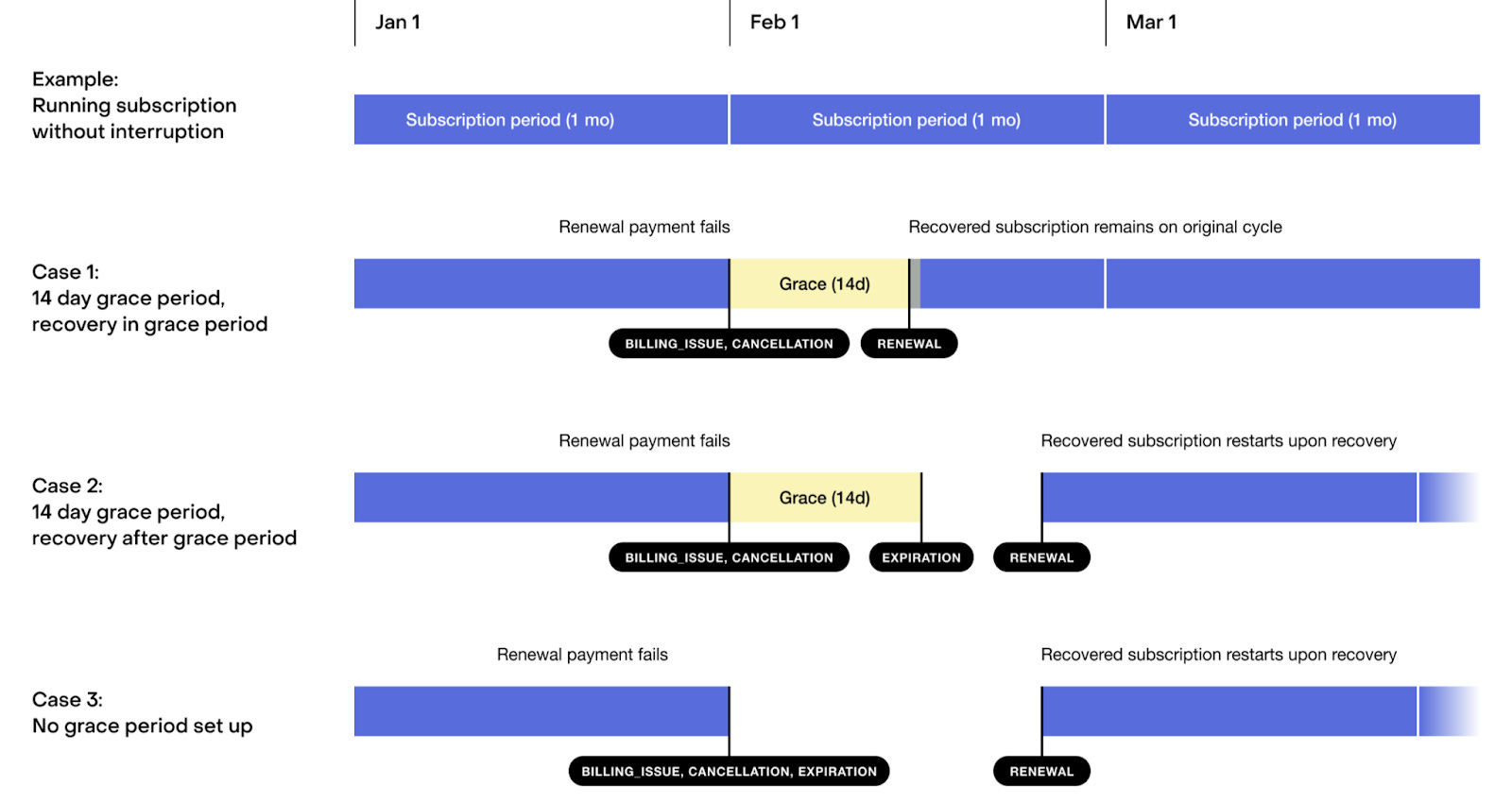
Grace periods exist because payment failures are often temporary. People update cards, transfer funds, or retry. Without grace, you’d cancel paying customers too quickly.
Grace Periods vs. Billing Retries
A lot of analysts don’t know about the difference between billing retries or confuse them.
Grace period = how long the subscription remains active after payment fails.
Billing retries = how many times (and how often) the system tries to charge the user again.
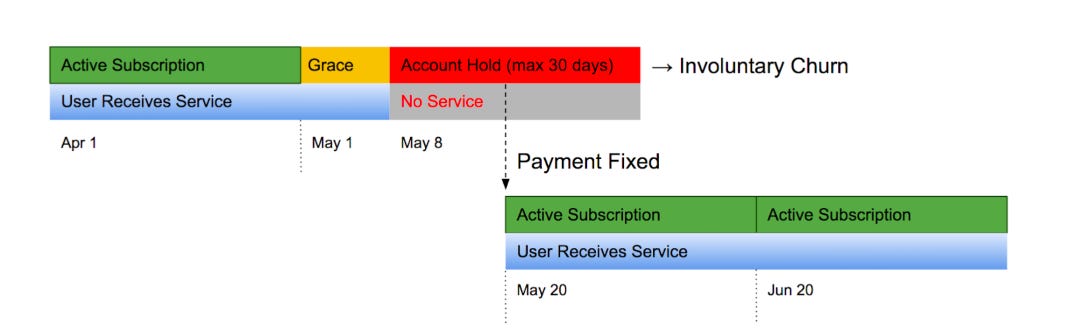
The yellow section in the image above represents the grace period. In most cases, customers can still access all features during this time. The red section represents the billing retry period. Here, the account is on hold - customers can’t use the product, but if payment is recovered, they return to their original subscription. If the billing retry period expires and payment still fails, customers must start a new subscription when they return.
How grace periods affect subscription growth reporting
This is where it gets tricky. Grace periods create those annoying 2–4% discrepancies between Renewals, New subscriptions, and Active subscriber totals.
These gaps happen because not every “expired” subscription should actually be churn. The grace window buys users time to stay:
